
Lodbrok.be
Back to Official Project page.
TXAdmin (main bundle)
TXA Documentation -- TO BE EXPECTED
3PTY (srink-wrapped or INSTALL guide/script)
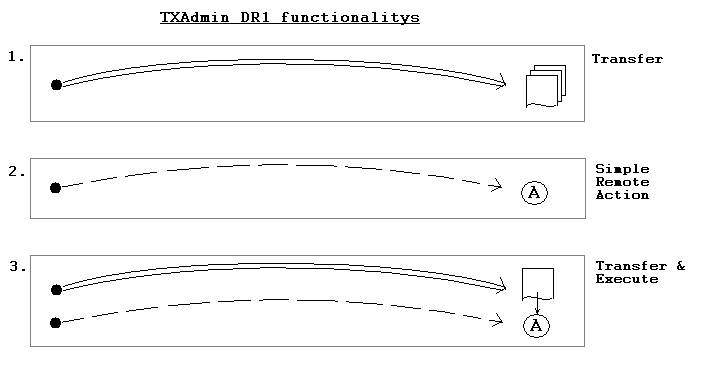
DRx = DR stands for Distribute & Run. It is semi automation software for disribution of directory trees and execution of remote tasks. Both packages (DR1 and DR2) use entirely different concepts but the goal is the same!
If SSH is available use DR2, for newbies to DR2 start with the sguide command (after reading the README of course ;)
Sample of the "sguide" starting screen:
                  WELCOME TO THE DS2 GUIDE

 This script will guide you step-by-step trough the process
 of executing remote tasks. A config file will be created
 for you in your personal homedir to work with (but only if
 it does not exist). The name of this config is (by default)
 "sconf".

 The next step will trow you into vi to edit the sconf file in
 your homedir. After editing, saving the file and exitting vi
 you will be prompted for the next step. At every prompt you
 can [CTRL]-[C] to abort. Below we list the steps we follow...
   1. create a config file (vi $HOME/sconf),
   2. generate an automation script (sgen),
   3. visual check of the generated script (cat $HOME/srunit),
   4. run the script with the automator (sauto with options),
   5. backup the config after execution (add timestamp).

Press ENTER to EDIT the config...

ssh ragnarlodbrok@shell.sourceforge.net
/home/users/r/ra/ragnarlodbrok
/home/groups/t/tx/txadmin
/home/groups/t/tx/txadmin/htdocs> cat index.php
<?php header("Location: http://txadmin.lodbrok.be/"); exit; ?>
su - can be used to replace sudo.
simplistic example
# cat s1 s3
echo "hello"
echo "hello2"
# ls s1 s3 | ./sauto -batch
Files(scripts) to execute...
s1
s3
s1:s3
Launch: s1
Launch: s3
child (29707) returned
child (29705) returned
passses:1(0.04) for 2 tasks.
====> Searching for errors in log...
(see dist.log for further details, current session = 20130718T112857)

# spar directly to sauto
tn95062@segotl0225:/home/tn95062# spar | sed -e '/^$/d' -e '/output/d' | sauto
Files(scripts) to execute...
/home/tn95062/srundir/srunit.segotl0956
/home/tn95062/srundir/srunit.segotl0955
Uniform password: ********
/home/tn95062/srundir/srunit.segotl0956:/home/tn95062/srundir/srunit.segotl0955
Launch: /home/tn95062/srundir/srunit.segotl0956
Launch: /home/tn95062/srundir/srunit.segotl0955
child (20037) returned
child (20035) returned
passses:1(0.04) for 2 tasks.
====> Searching for errors in log...
(see dist.log for further details, current session = 20130718T122007)

note: this is now patched, you can pipe spar to sauto (spar | sauto)
-lineprocessing=no
tn95062@segotl0225:/home/tn95062/tmp-system# cat dist.log
==session==> 20130718T150730
==command==> /home/tn95062/tmp-system/s4
hello
hello2
==endofsession==> 20130718T150730 at 20130718T150730

-lineprocessing=yes
tn95062@segotl0225:/home/tn95062/tmp-system# cat dist.log
==session==> 20130718T150819
==command==> echo "hello"
hello
==command==> echo "hello2"
hello2
==endofsession==> 20130718T150819 at 20130718T150820
With the "batch"-option for sauto you don't request passwd but still need accept fingerprints... to fix this you can use the "lineprocessing"-option.
At the moment the spar feature and the "lineprocessing"-option (usually required for batch) cannot be combined. You can try but it will, most likely, not work as expected. So at the moment you can only have 2 modes of working:
Only when sequence of individual commanbds and methods (in srunit) does not matter.
Q. Is that the only situation?
A. not really, if you know what you are doing, you can craft series of commands to run in parallel.
Example:
serial
# cat srunit
echo "hello"
sleep 10
echo "endsleep hello"
echo "hello2"
sleep 10
echo "endsleep hello2"

# time sauto -s=srunit -b
Launch: srunit
====> Searching for errors in log...
(see dist.log for further details, current session = 20130718T154645)
real    0m20.08s
user    0m0.06s
sys     0m0.01s

# cat dist.log
==session==> 20130718T154645
==command==> srunit
hello
endsleep hello
hello2
endsleep hello2
==endofsession==> 20130718T154645 at 20130718T154705
parallel
# cat srundir/srunit.series1
echo "hello"
sleep 10
echo "endsleep hello"
# cat srundir/srunit.series2
echo "hello2"
sleep 10
echo "endsleep hello2"

# ls -1 srundir/srun* | time sauto -b
Files(scripts) to execute...
srundir/srunit.series1
srundir/srunit.series2
srundir/srunit.series1:srundir/srunit.series2
Launch: srundir/srunit.series1
Launch: srundir/srunit.series2
child (20265) returned
child (20267) returned
passses:1(0.04) for 2 tasks.
====> Searching for errors in log...
(see dist.log for further details, current session = 20130718T155231)
real    0m10.10s
user    0m0.07s
sys     0m0.03s

# cat dist.log
==session==> 20130718T155231
==command==> srundir/srunit.series1
==command==> srundir/srunit.series2
hello
hello2
endsleep hello
endsleep hello2
==endofsession==> 20130718T155231 at 20130718T155241
By default the tools (like sgen) will assume to use the $(loguser) account (user that you used to logon with on the central system). With the sgen --user parameter this can be overwritten. Useful for keygen distribution of a "generic" account.
rm dist.log
sshtest /tmp/hostlist-installkey || exit 1
sgen -c /home/syeaix/key_exchanges/sconf.installkey -v -user syeaix
sauto -s /home/syeaix/srunit -l yes
rm /home/syeaix/srunit

$ cat sconf.installkey
%%
method:treecopy: COPY PUBLIC KEY FROM USER SYEAIX TO TARGET MACHINE
target:/tmp/hostlist-installkey
/home/syeaix/key_exchanges/id_rsa.pub.censerver
/tmp/
nosudo
%%
method:command: ADD PUBLIC KEY TO AUTHORIZED KEYS OF USER SYEAIX
target:/tmp/hostlist-installkey
(mkdir -p ~/.ssh
grep "syeaix\@censerver" ~/.ssh/authorized_keys || cat /tmp/id_rsa.pub.censerver >> ~/.ssh/authorized_keys
rm /tmp/id_rsa.pub.censerver)
%%
similar tool in python (seems less sophisticated)