
Lodbrok.be
This can be done without Macros by converting *through* bullet lists.
1) type or paste your tabbed text outline in word:
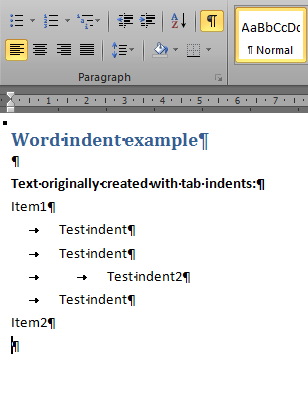
2) convert tabs to bullets lists:
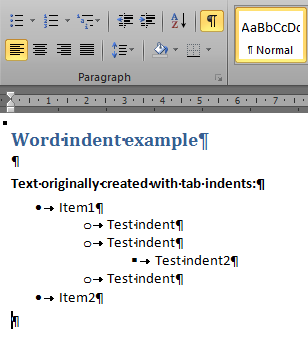
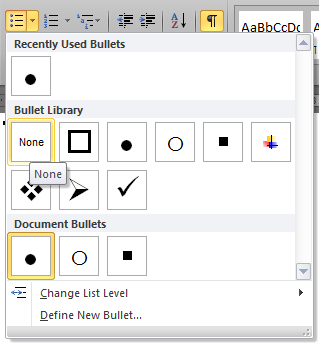
3) remove (set to "none") bullets:
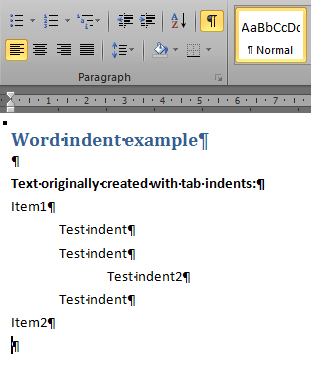
4) convert of tabs to indents completed:
Create new vbs macro and run to convert from indents to tabs.
Sub indents2tabs()

Dim p As Paragraph
Set hash = CreateObject("Scripting.Dictionary")
tabcount = 0
lineindent = 0

Application.ScreenUpdating = False 'close screen and refresh

'cycling in the pragraphs of the active document
For Each p In ActiveDocument.Paragraphs
  linetext = p.Range.Text
  previouslineindent = lineindent
  lineindent = p.LeftIndent
  'MsgBox (lineindent & " = " & linetext)
  If lineindent > 0 Then
    'MsgBox ("do something")
    p.LeftIndent = 0
    If lineindent > previouslineindent Then
        If hash.Item(lineindent) Then
            tabcount = hash.Item(lineindent)
            'MsgBox ("already got it:" & lineindent & "=" & hash.Item(lineindent))
        Else
            tabcount = tabcount + 1
            hash.Item(lineindent) = tabcount
        End If
    End If
    If lineindent < previouslineindent Then
        If hash.Item(lineindent) Then
            tabcount = hash.Item(lineindent)
            'MsgBox ("already got it:" & lineindent & "=" & hash.Item(lineindent))
        Else
            tabcount = tabcount - 1
            hash.Item(lineindent) = tabcount
        End If
    End If
    If lineindent = previouslineindent Then
        If hash.Item(lineindent) Then
            tabcount = hash.Item(lineindent)
            'MsgBox ("already got it:" & lineindent & "=" & hash.Item(lineindent))
        Else
            'tabcount = tabcount
            hash.Item(lineindent) = tabcount
        End If
    End If
    p.Range.InsertBefore (String(tabcount, Chr(9)))
    'p.Range.InsertBefore (String(tabcount, Chr(9)) & lineindent & "/" & tabcount)
  End If
Next p

Application.ScreenUpdating = True 'restore screen and refresh

End Sub